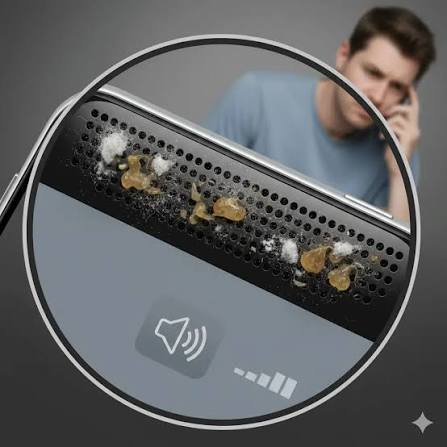

A smartphone speaker can collect dust, lint, and tiny particles with everyday use. Over time, this buildup can make music sound muffled, reduce volume, or affect the clarity of calls and videos. Regular phone speaker cleaning is a simple way to maintain better audio quality and keep your device in good condition.
This guide explains safe and practical ways to remove speaker dust without damaging your phone. It also covers common mistakes to avoid and what you can do when your speaker still sounds unclear after cleaning.
Why Does Phone Speaker Dust Build Up?
Modern smartphones have small speaker openings that allow sound to travel outside the device. Because these openings are exposed, they can collect particles from the surrounding environment.
Common sources of speaker dust include:
- Pocket lint
- Household dust
- Sand and dirt
- Food particles
- Cosmetic residue
- Pet hair
- Dusty work environments
- General daily use
The amount of buildup depends on how often and where you use your phone. Someone who regularly carries a phone in a pocket may notice lint collecting around the speaker more quickly.
How Do You Know Your Speaker Needs Cleaning?
A dirty speaker does not always look obviously blocked. Sometimes the first sign is a change in audio quality.
You may need to clean the speaker if:
- Music sounds quieter than usual.
- Voices sound muffled.
- Audio becomes distorted at higher volume.
- You notice visible dust around the speaker grille.
- Phone calls sound less clear.
- Your speaker sounds different from when the phone was new.
Before cleaning, check your volume settings and test different applications. This can help determine whether the problem is actually related to dirt.
Safe Methods for Phone Speaker Cleaning
When cleaning a smartphone speaker, always start with the gentlest method. The speaker components and protective mesh can be delicate, so aggressive cleaning may cause more harm than good.
Use a Soft Brush
A clean, soft-bristled brush is one of the simplest tools for removing loose dust.
Hold the phone securely and gently brush across the speaker grille. Use light strokes instead of pushing the brush into the openings.
An electronics-cleaning brush is ideal because it is designed for small and delicate components. If you do not have one, a very soft, clean toothbrush can be used carefully for surface dust.
Use a Microfiber Cloth
A dry microfiber cloth can remove dust from the area around the speaker.
Gently wipe the surface without pushing the cloth into the speaker openings. This is particularly useful after brushing because loose particles may remain around the grille.
Try Gentle Airflow
Gentle airflow may help remove loose particles from the speaker.
Avoid using powerful compressed air directly against the speaker because high pressure can push dust further into the phone.
You should also avoid blowing into the speaker with your mouth. Your breath contains moisture, which is not ideal for electronic components.
What Is Fix My Speaker Dust?
If your speaker sounds muffled because of dust or minor moisture, Fix My Speaker Dust can be another option to explore. Sound-based speaker cleaning tools are designed to play specific frequencies that may help move certain particles or moisture away from the speaker area.
These tools are most useful when the issue is related to minor moisture or loose particles. They should not be considered a replacement for professional repair when a phone has serious hardware damage.
If your speaker grille is visibly covered with dust, physical cleaning with an appropriate soft brush should be considered first.
Can You Use Water to Clean a Phone Speaker?
Directly applying water to a phone speaker is generally not recommended.
Even smartphones with water-resistance ratings are not designed to be routinely washed or intentionally exposed to liquid. Water resistance can also become less reliable after drops, cracks, repairs, or normal aging.
For everyday phone speaker cleaning, dry methods are usually the safer choice.
If your phone has accidentally become wet, follow the manufacturer’s instructions for drying the device instead of adding more liquid.
Things You Should Never Use
One of the biggest mistakes when cleaning a speaker is using sharp objects to remove dirt.
Avoid:
- Needles
- Pins
- Paper clips
- Metal picks
- Blades
- Sharp tools
- Excessive adhesive
Pushing a sharp object into the speaker grille can damage the protective mesh or internal components. It can also push dust deeper into the device.
The goal should always be to remove particles from the surface rather than forcing them inside.
How Often Should You Clean Your Speaker?
There is no universal cleaning schedule for every smartphone. It depends on your environment and how frequently you use your device.
If you regularly carry your phone in your pocket, you may want to inspect the speaker every few weeks. If you work around dust, sand, or other particles, more frequent inspections may be useful.
A simple maintenance routine is enough:
- Check the speaker grille.
- Look for visible dust or lint.
- Gently brush the surface.
- Wipe the surrounding area with a microfiber cloth.
- Test the audio.
Regular light cleaning is generally better than waiting until the speaker becomes heavily blocked.
Tips to Prevent Speaker Dust
Preventing dust buildup can make cleaning easier.
Keep your phone away from dusty surfaces and avoid placing it directly on floors, workbenches, or dirty tables. Clean your phone case regularly because dirt trapped inside the case can transfer to the device.
You can also keep your smartphone in a clean pocket or protective pouch when you are working in a dusty environment.
Avoid eating directly over your phone whenever possible. Small food particles can easily reach speaker openings and other ports.
What If Cleaning Does Not Fix the Problem?
Not every speaker problem is caused by dust.
If your phone continues to produce distorted or quiet audio after cleaning, there may be another cause. Hardware damage, water exposure, software problems, or a damaged speaker component can all affect sound.
Try restarting your phone and checking the volume and sound settings. Test multiple apps to determine whether the issue happens everywhere.
If the problem remains, professional inspection may be necessary. Avoid repeatedly cleaning or poking the speaker because this could make an existing hardware problem worse.
Final Thoughts
Good phone speaker cleaning does not require complicated equipment. A soft brush, dry microfiber cloth, and careful handling are usually enough for routine maintenance.
Avoid water, sharp objects, excessive pressure, and powerful compressed air. If your speaker has minor moisture or loose-particle issues, Fix My Speaker Dust may also provide a convenient sound-based option to explore.
By checking your speaker regularly and removing dust gently, you can help maintain clearer audio and reduce the chance of buildup affecting your smartphone’s everyday performance.